Translate

Showing posts with label typescript. Show all posts

Thursday, 4 April 2019

BDD with Jest + Cucumber & Typescript

Continuing on the previous post on the Tesla Auto Pilot crash mode malfunction, here is a working code example of the feature.

The advantage of BDD is that you can not only keep the business engaged in the development process but also ensure that there are no disputes nor any cost of change as every business requirement gets neatly described as features from which all the possible scenarios based on business rules can be elaborated into crystal clear test cases.

The other advantage, of course, is that Test Driven Development becomes easy to implement as the BDD phase effectively outlines just those test cases for code to be written against for the feature to be realized.

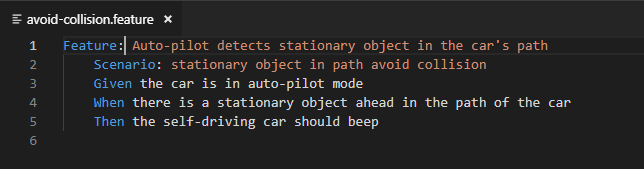
Here is the example scenario of the auto-pilot mode beeping if the car is in auto-pilot mode.

So, effectively, there are two scenarios for the feature test to pass -

1. The car should be on auto-pilot mode.
2. The beep should be set on only if the auto-pilot mode is on and there is an object ahead.

Remember that BDD is about testing scenarios and so we don't have asserts but expects.

npm Packages used: jest, jest-cucumber, typescript, babel
Platform: nodejs
Dev tool: VS Code
Language: English :), typescript

jest-cucumber, by default, checks all tests defined under a _tests_ folder and if one does not exist then it follows the path given in the config file or in the testMatch in the package.json file.

The feature is clearly described in a .feature file as below. Remember that the gherkin syntax of given, when, then should match the scenario described in this .feature file.


The gherkin steps are defined in the .steps. file.


The actual code to test the expectation is the source code as below:


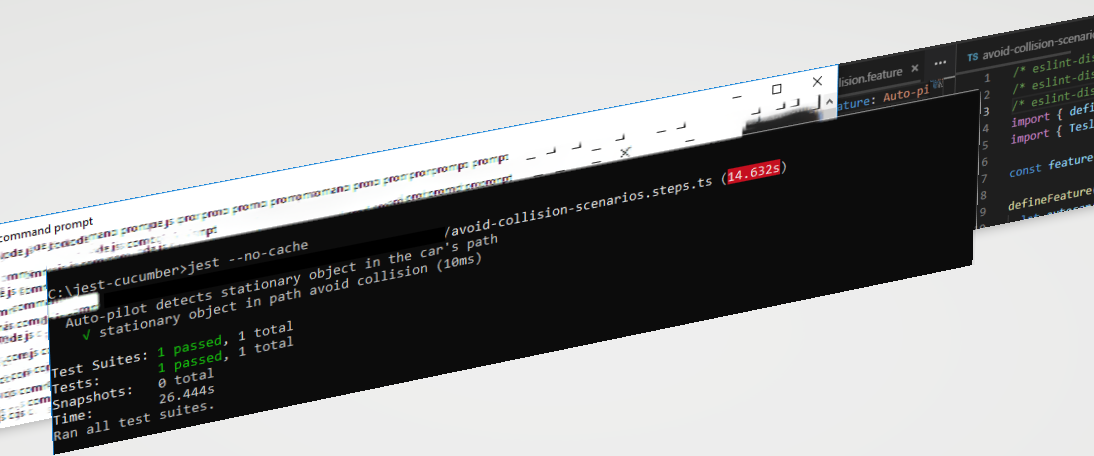
Run the test with jest.
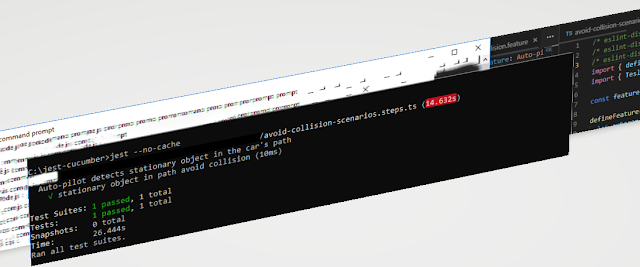


Now, change the scenario description.


and running the test would cause the test runner to display errors because the scenario text has changed and does not match the scenario being tested for in the .steps file.


Similarly, if the source code running the test is changed and the distance is not set, then, too, the test will fail because expectations are not met!


The code change is the commented call to the method that sets the object ahead's distance (hypothetical) and so the test will fail when it tries to match the distance between the car and the object ahead.


Similarly, if the auto-pilot mode is not set the test will fail as that is the base scenario test!

From the above, you can easily perceive that the advantages of using jest-cucumber for BDD are obvious and numerous.
  1. Business can easily stay on track with development efforts.
  2. Wastage in effort and time as well as cost is reduced due to the traceability of requirements to code and vice-versa.
  3. Code waste is reduced. Only that much code is written in the TDD phase as defined by the BDD phase.
  4. Audits become simple because of the end-to-end testing available with one click.
With scaled agile frameworks like Safe, which require BDD and TDD to be well implemented, jest-cucumber and jest are incredible tools to infuse maximum agility into the software development process.

Of course, this is not to say that other tools like SpecFlow that are used for other frameworks like .Net or Java are not good, they all serve the same purpose - of defining features, deriving scenarios, writing test cases either in gherkin form or otherwise to automate the testing of your system.

Binding the test results from the above phases along with Selenium or Acceptance/Functional tests with test coverage completes the automated requirements for DevOps.

Happy BDD-ing! :)

Thursday, 3 May 2018

A binary converter in typescript and a reference to blockchain

While writing a binary to a decimal converter in Typescript, I came across the idea of using the example of a class of students in which every student is given a binary value and asked to convert it to a decimal value.

Add a little imagination to the idea and you can come up with an interesting parallel of how a BlockChain node functions - imagine a guy not sure if the steps that he has used to convert a binary to a decimal value is correct or not and asks the nearest neighboring girl for the answer and she gives him the SHA256 hash value of, let's say, 268 (the solution), the decimal equivalent of 100001100, which is 8b496bf96bbcc9e5ac11c068b6cfb00c32f9d163bb8a3d5af107217499de997a!

Now, the guy has the hash value and knows that till his steps yield the decimal value whose sha256 hash value matches the hash given to him, he must process the steps. This, in effect, explains what happens in mining a blockchain node.

Anyway, the code is as below: (Edit: a note on refactoring: although the code has been written with a unit test and the test was written first, it is only partially refactored, for reasons of obfuscating the logic.

Point is, many bots or maybe just humans ;) mine for code but don't bother to even leave a note of thanks and when I noticed this way back in the early 2000s, I did not bother to correct Blogger's tendency to eat up the angular brackets as used in C code where the #include statements require the < and > and even changed all the return statements to return 1 instead of 0. Make them think, don't you think? :))

// binaryconverter.ts

export default class BinaryConverter{
convertBinaryToDecimal(n){
let z=1,b=0,val=0, zeroFlag=false
b=n.length-1
for (let a in n){
var num=0
for (num=b;num>0;num--){
z*=2*n[a]
}
if (num==b){
z=0
zeroFlag=true
}
else if (num!=b){
val+=z
z=1
}
b--
}
if (zeroFlag==true && n[n.length-1]==1)val++
return val;
}
}

and the mocha test,

import BinaryConverter from '../src/ComputeBinary.ts'
import {expect} from 'chai'
describe('Computation test',()=>{
it('to check if binary conversion is successful', ()=>{
var b=new BinaryConverter()
var bin='100001100', binResult=0
binResult=b.convertBinaryToDecimal(bin)
expect(binResult).to.equal(267)
})
})

The test result: I include the screenshot, usually, to complete the cycle of learning for the reader as the command line switches and flags, if not known, will not compile or may produce a different output.

If your test does not run from your default installation, install typescript and ts-node using npm install - explained in previous posts related to typescript.


I will try to build on this example with a blockchain reference in future posts

Thursday, 5 April 2018

Generic type constraints in Typescript

Platform: nodejs
npm install typescript, ts-node, mocha, babel

Generics from the C# days of 2005 onwards is a much-underused technique to implement type safety and security.

Here is a look at the fascinating feature using a mocha test and a couple of es6 classes and interface. Needless to say, this post, too, is inspired by a question from SO.

First, the premise.

An interface - interface DiscreteLinearOrder - with a generic type constraint - - declares two methods - next and lessThanOne - which are implemented in all deriving classes.

Another class that implements this interface imposes its own constraint in this form -

class DLOinterval<V, U extends DiscreteLinearOrder<any>>
implements DiscreteLinearOrder -

for the simple requirement that any consuming object is not typed as

const aaa = new abc.DLOinterval<number, string
>

or any other type but DiscreteLinearOrder interface type.

Like so,

const aaa = new abc.DLOinterval<number, abc.DLOnumber>

where abc.DLOnumber is another class implementing the DiscreteLinearOrder interface.


The interesting aspect that I originally chose this scenario was to explore the type inference happening at compile time in generics ie.,


The red squiggly line, in the above screenshot, indicates an error that since T is already the first parameter, typing another parameter with the same constraint causes the compiler to build an inference tree from the same parameter list, which had it not been a generic type would have simply been explained as a variable name already used but since T is not a variable but a type, it demonstrates that its duplicate usage causes a constraint to become almost like an infinite constraint as they both refer to each other!

Below is the code to be compiled with 

  1. tsc   
  2. mocha --compilers <path to ts-node\register> testfilename.ts
// testname.ts
import {expect} from 'chai'
import * as abc from './discretelo'
import 'mocha'
describe('a test', () => { 
it('interface', function(){
const aaa = new abc.DLOinterval<number, abc.DLOnumber>
(new abc.DLOnumber(3),new abc.DLOnumber(5),null,2)
    expect(aaa.next()).to.equal(3)
})
});
// discretelo.ts

interface DiscreteLinearOrder<T> {
    next:()=>T;
    lessThan(y:T):Boolean;
}
export class DLOnumber implements DiscreteLinearOrder<number> {
    private value: number;
    constructor(x: number) { this.value = x; }
    next = () => { return(this.value + 1); };
    lessThan = (y: number) => { return(this.value < y); };
    getValue = () => { return(this.value.toString()); }
}
export class DLOinterval<V, U extends DiscreteLinearOrder<any>>
implements DiscreteLinearOrder<number>{
    private start: U;
    private end: U;
    private data: any;
    private value: number;
    constructor(s: U, e: U, d: any,v:number) {
        this.value=v
        this.start = s;
        this.end   = e;
        this.data  = d;
    }
        next = () => { return(this.value + 2); };
        lessThan = (y: number) => { return(this.value < y); };
}


Make the test pass by changing the expected value!

Happy generic testing typsecript!

Friday, 30 March 2018

Testing a typescript class with mocha

Platform: nodejs
Install typescript, mocha for nodejs and the associated typings for mocha. 

The story starts with coming across some mocha problem caused by the usage of the implements keyword in Typescript in one of the forums for techies.

As ever, I picked it up and decided to write a mocha test to see what was the problem.

The test result revelations were as interesting as the Cambridge analytica fiasco and the subsequent handling of it in Singapore!

Some premise before I take you through to the bumper details!
.
An interface, in Typescript, serves as the blueprint much like in the other languages but it serves an additional purpose of defining how classes would implement them.

For instance, for a class that accepts a locale and a local time value, if the interface types the two parameters as a string and a number, scoped public respectively, then the class is forced to apply the same constraints. Even implementing the public property as private is not allowed.


// IClockTime.ts

export default interface IClockTime {
    new (time: number): IClock;
}

// IClock.ts

export default interface IClock {
    currentTime: number;
    locale: string;  
}

// Clock.ts

import IClock from './IClock'
import IClockTime from './IClockTime'
export default class Clock implements IClock {
    constructor(public currentTime:string) { 
        this.currentTime=currentTime
        }        
    public tellTime(t:IClockTime){
            return new t(this.currentTime);
        }
}

// AnotherClock.ts

import IClock from './IClock'
import IClockTime from './IClockTime'
export default class AnotherClock implements IClock {
    constructor (public currentTime: string, count: number) {
        this.currentTime=currentTime
        this.count=count
    }
    public tellTime(t:IClockTime){
            return new t(this.currentTime);
        }
}

// interfacestest.ts

import ClockTime from './IClockTime'
import AnotherClock from './anotherclock'
import Clock from './clock';
import {expect} from 'chai'
import 'mocha'
describe('an interface test', () => {  
it('to check time', () => {
var cc: ClockTime=Clock;
var cc1:ClockTime=AnotherClock
var ci = new cc(9.15,"GMT",12);
    expect(ci.tellTime(Clock)).to.equal('9:15');
  });
});


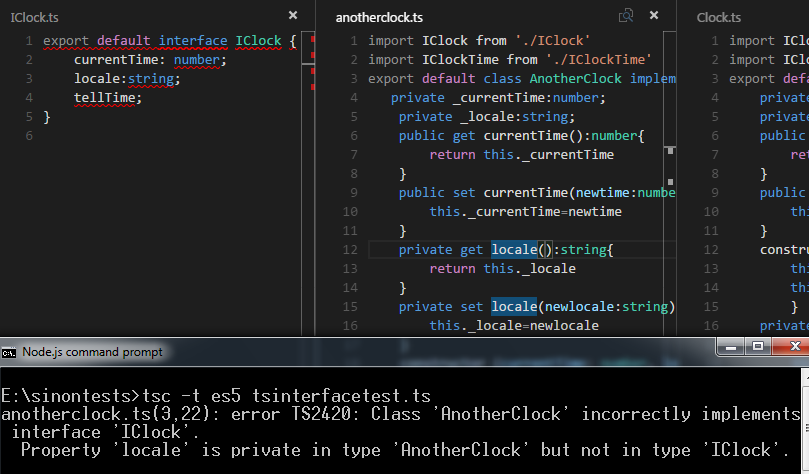
The tsc compiler is shrewd! It has noticed that the AnotherClock class has gone ahead and implemented some member of its own and not followed the blueprint provided by the IClock interface. This is much in the comfort zone of C# programmers.

It also correctly identifies what all AnotherClock has incorrectly implemented.

Modify the anotherClock class like so:

// AnotherClock.ts

import IClock from './IClock'
import IClockTime from './IClockTime'
export default class AnotherClock implements IClock {
   private _currentTime:number;
    private _locale:string;
    public get currentTime():number{
        return this._currentTime
    }
    public set currentTime(newtime:number){
        this._currentTime=newtime
    }
    private get locale():string{
        return this._locale
    }    
    private set locale(newlocale:string){
        this._locale=newlocale
    }
    constructor (currentTime: number, locale: string) {
        this.currentTime=currentTime
        this._locale=locale
    }
    public tellTime(){
            return this.currentTime;
        }
}

And you get errors from tsc that the property locale is not in sync with how the interface published it!


I will scope this to an example of a test of the class behavior and test whether the Clock returns the time expected of it, given the locale.

The Clock class, too, attempts its own tricks by supplying a string to a parameter of type IClockTime when it types the parameter of the checkLocale() method as a IClockTime rather than as a string. Change the parameter from t:IClockTime to t:string.

Modify the Clock class like so:

import IClock from './IClock'
import IClockTime from './IClockTime'
export default class Clock implements IClock {
    private _currentTime:number;
    private _locale:string;
    public get currentTime():number{
        return this._currentTime
    }
    public set currentTime(newtime:number){
        this._currentTime=newtime
    }
    constructor(currentTime:number, public locale:string) { 
        this.currentTime=currentTime
        this._locale=locale
        }        
    private checkLocaleTime(t:string){
        if (this._locale==="GMT")
        this.currentTime=this.currentTime-5.00
        
    }
    public tellTime(){
            this.checkLocaleTime(this.locale)
            console.log(this.currentTime)
            return this.currentTime.toString();
        }
}


Modify the test like so:

// interfacetest.ts

import ClockTime from './IClockTime'
import anotherClock from './anotherclock'
import Clock from './clock';
import IClock from './IClock'
import {expect} from 'chai'
import 'mocha'
describe('an interface test', () => {  
it('to check time', () => {
let cc= new Clock(9.15,"GMT");
    expect(cc.tellTime()).to.equal('9:15');
  });
});


Modify the expectation to match the GMT (approx.!) time and make the test pass!

Happy typescripting interfaces and classes for ES5!