Translate

Friday, 12 February 2016

VS2015, NUGet and NUnit Test Adapter bug

Is it a VS 2015 bug or a NuGet one - there are so many weird bugs whenever NuGet is used to install packages!

One such bug can be replicated by following the below bullet-ed steps:

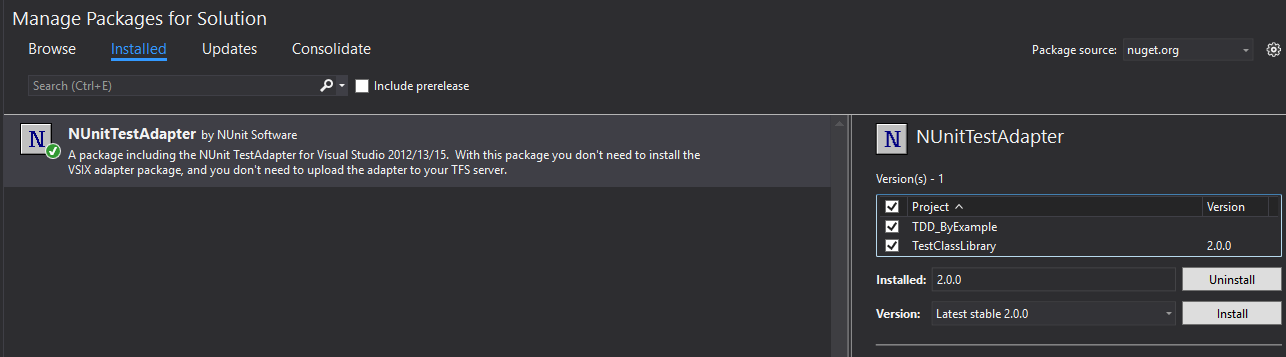
  1. Install NUnitTestAdapter with NUGet (not the one with the WithFramework) in your NUnit test project. Set the test project's target framework version to "4.5"
  2. Check the Test Explorer and the target framework Settings of the project to ensure both synchronize.
  3. Add another project (say, for example, a class library to be tested from your NUnit test project). Set your project's target framework version to "4.5.2"
  4. Add reference to NUnit v2.6.4 (not v3.0 and not through NUGet) after downloading it from NUnit dot org and add some tests in your test project. 
  5. Build solution. You should see some warnings as below.

Open the Test Explorer window. from Test->Windows->Test Explorer and click Run all... No tests will appear in the Test Explorer because the tests cannot be discovered due to Build errors!!

Warnings are errors? Rhetorical question, of course.


Change the other project to target the same framework version as your test project's and rebuild.

Now check out the Test Explorer.


Friday, 18 December 2015

Given, when, then

One of the most fascinating games that humans play is Chess because it is not just a great mind game (or game of minds), it is also a game that enables many institutions and disciplines to function in a standard, universally acknowledged manner.


The fundamentals of Chess begins with the opening.

A chess opening is a sequence of moves that have to be played in a certain way (not as in 'discipline' that you have to play so but in a form much like how constellations are identified). There are many chess openings, as there are many constellations and design patterns (software), that are identified with the formation of the pawns structure, the placement of the other pieces in relation with the pawns etc.

Much like other conventions, many are puzzled as to why these openings emerge. One of the best way to understand the need for Chess Openings, as an accepted tool of study to play better and competitive chess, is by looking at one of the most popular Chess Openings of them all - the Dragon variation of the Sicilian defense.

The Sicilian - Dragon variation


As the name suggests, it is played by the player playing Black hence, the name 'Defense' but it is popular because of the high octane attack that it enables for Black on the Queen side of the Chess board.

The 'simulated' Dragon

Sicilian Dragon is one of the few variations in Chess Openings that can be explained clearly not just as an opening but why the Black Bishop serves its purpose at g7.

Here is a 'simulated' dragon (the theory is the same but the Bishop's position is not where it should be even though the diagonal remains the same) that loses black two to three moves that shows in the subsequent moves of the game how handy the two or three moves 'lead' time, also called as 'tempo', could have been for black.

Edit: This game was being played Live while I wrote this and I expected the 'tempo' was lost for Black and that White would capitalise on it, in the subsequent moves (if White had been enterprising and sacrificed with Ndxe6, fxe6, followed by Bxc5 !! recovering the sacrificed Knight, losing the White Knight on C3 immediately, but following with either Rxd6 or Bxd6, winning the exchange and a pawn and, of course, the simplest bxc5, Qa5 Ncb1 not Nb3 because Qxa3+ wins back a Knight with Bxc3) but...!


Given that the black Bishop was not in 'f6' but in 'g7'. 


And after just 7 moves, after move 15...Bf6, here is the resulting board position!

And after just another move, White is in total disarray.


The reason why it is called the Dragon !

Season's greetings, happy holidays and wishing a great happy new year for all my readers, followers, blogger family and friends ! :)

To be contd.
Monday, 7 December 2015

The Scrum Planner

Organizing the story board is usually dependant on the automated tool that is used. Often, when we use a real life story board like a white board, there are the same maintenance issues that usually pertain to communication. How to convey the right picture to the team?


When a task is slipping or lagging, do simple updates in stand-ups help or do you need an additional input? And if you do, where should the output, a graph or alerts, be conveyed to - the team, the management or presuming you are doing Scrum, with the ScrumMaster?


Role based users - the Scrum Planner is accessible only for Scrum-mers and the Sprint Planner only for the Sprint-ers !


The Scrum / Sprint Planner does just this - it helps you with a template of pre-assigned roles and responsibilities as defined in Scrum and as an experienced Agile practitioner, like me, would use it. Developed for Excel, this add-in is the complete solution for all your Scrum needs. Follow my blog to stay updated on the release date for this tool.


Sunday, 4 October 2015

Working with Code 2015 using Sharepoint 365


This (please refer to the steps below) will work only if you use IE as your internet browser. 

1. Open your Sharepoint site (Site Collection).
2. Click on Documents in the left pane menu.
3. Click Library on the tab above.
4. In the Ribbon menu, locate "Open with Explorer" and click it.
5. Once the Windows Explorer opens, copy the url
6. Click Map Network Drive from Windows Explorer's left pane and paste this URL.
[7. Check if Keep me signed in option had been checked when you logged into your Sharepoint site otherwise, an error may occur. If it still does not work, check if your Sharepoint site is added to your browser's Trusted sites].
8. Open Visual Studio Code or copy/paste your existing VS Project to this location.
9. Microsoft's OneDrive will take care of syncing the files/folder with your Sharepoint Document Library.

So, beyond Napa 365 and Visual Studio 2012 Ultimate, you can now also use the lightweight super IDE - Code!

Happy Code-ing !